How to connect customer service, contact history, escalation, and reporting without opening unrestricted access to sales information. This guide is written for a software company connecting its support desk with a sales and account-management CRM. It explains the tradeoffs a buyer can check without treating sales claims, product popularity, or advertising promises as independent evidence.
At the beginning of an evaluation, the most useful question is not which dashboard looks modern, but what the proposed process will actually require. For this subject, the central decision is specific: Share the minimum service context required to solve an issue, and keep sensitive commercial records inside their proper boundary. The examples below are illustrative exercises, not claims that any named supplier has failed or passed an audit. Features, prices, data processing terms, and plan availability can change; verify the actual service before purchasing.
Begin with a decision the organization can defend
Consider the following representative situation: A software company connecting its support desk with a sales and account-management CRM. A selection meeting will be more useful if it establishes owners, measurable acceptance criteria, and the information the chosen service must protect. A product demonstration is a starting point for asking better questions; it should not replace a documented trial, a contract review, or a defined recovery route.
Share the minimum service context required to solve an issue, and keep sensitive commercial records inside their proper boundary. Put this sentence at the top of the evaluation worksheet and ask each stakeholder to state which evidence would change their recommendation. That exercise prevents a conversation about attractive features from displacing practical questions about data handling, team adoption, business continuity, and responsibilities after launch.
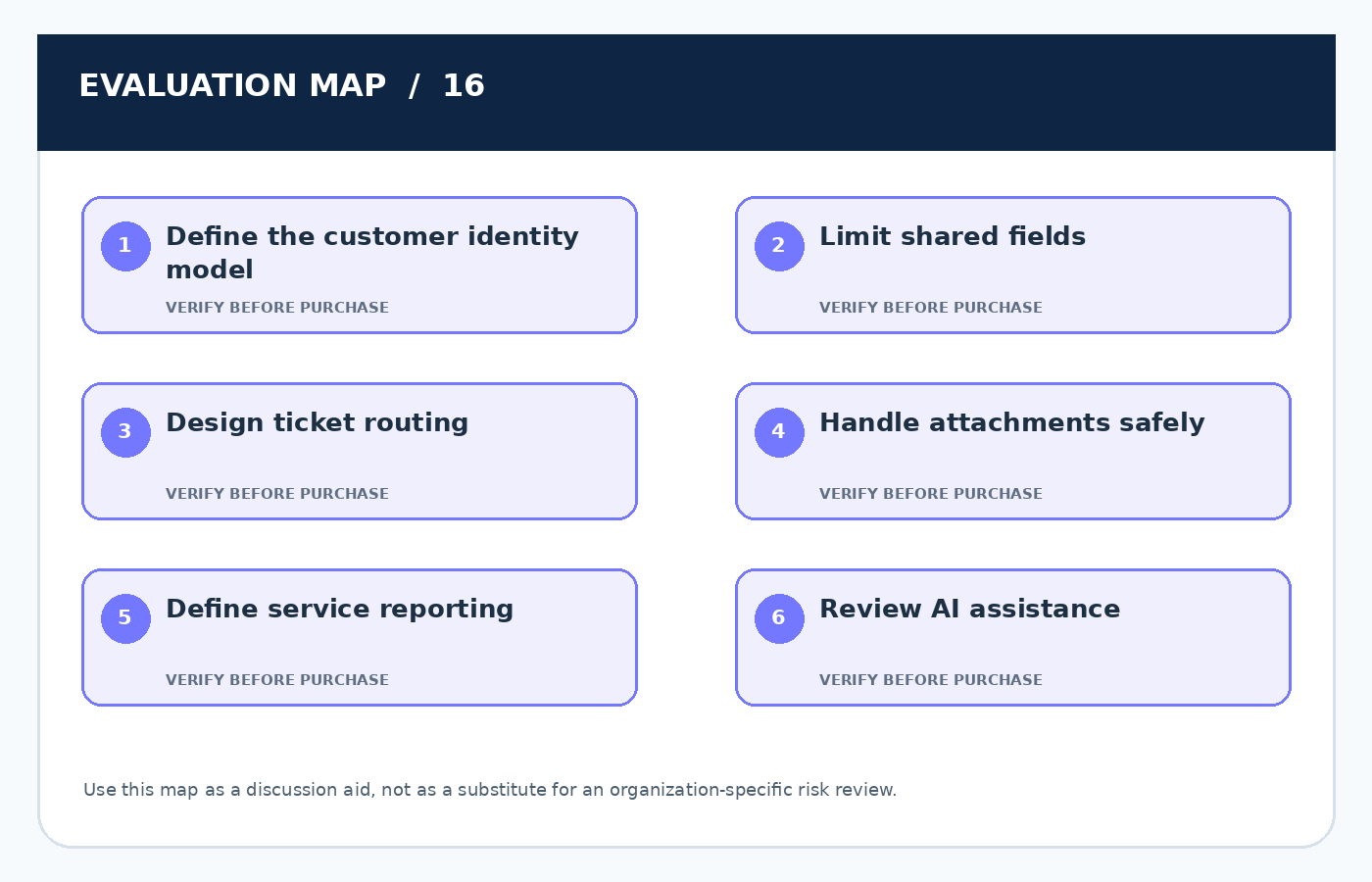
Eight issues to evaluate in depth
1. Define the customer identity model
Match account IDs, contacts, verified email addresses, and entitlement status so service agents can recognize a legitimate requester.
Failure to anticipate: Matching tickets to accounts on an unverified email alone can disclose another customer's purchase, contract, or support history.
Evidence to request: Test identity conflicts, shared inboxes, aliases, and multi-subsidiary organizations with fictional service records.
2. Limit shared fields
Support may need service tier, product configuration, renewal owner, and historical escalations without full pipeline forecasts or negotiation notes.
Failure to anticipate: Copying entire CRM objects to a ticket system increases data exposure and makes permissions more difficult to reason about.
Evidence to request: Write a field-level synchronization contract and verify restricted values are absent from search, ticket exports, and notifications.
3. Design ticket routing
Clear priorities, ownership, handoff rules, and escalation criteria matter more than automatically creating as many tickets as possible.
Failure to anticipate: Unmanaged bidirectional automation can generate loops where each CRM update opens another ticket or reassigns an already resolved case.
Evidence to request: Test create, update, close, reopen, and failure transitions end to end, including events that arrive out of order.
4. Handle attachments safely
Support screenshots and diagnostic files may contain credentials, customer identifiers, confidential designs, or logs with personal information.
Failure to anticipate: Agents may forward an attachment through ordinary email or store it indefinitely even after the incident is resolved.
Evidence to request: Establish redaction guidance, scanning and access controls, safe retention, and an approved route for especially sensitive evidence.
5. Define service reporting
First response, resolution, reopening, satisfaction, and escalation rates are distinct metrics that can be gamed by poor workflow design.
Failure to anticipate: Automatically closing tickets for a fast average resolution can improve a dashboard while leaving actual customers without a solution.
Evidence to request: Select definitions before launch and audit a sample of cases to confirm the figures match genuine service quality.
6. Review AI assistance
Suggested responses and summaries can save agent time but may fabricate policy commitments or reveal unnecessary customer context.
Failure to anticipate: An auto-reply based on stale documentation can promise compensation or instructions not approved by the service owner.
Evidence to request: Use retrieval from approved knowledge, agent approval for external messages, tracked corrections, and restricted access to sensitive tickets.
7. Protect external access
Customers and partners may use portals, delegated accounts, or shared contacts to inspect ticket status without seeing another organization's cases.
Failure to anticipate: A mistaken portal role can expose conversations, attachments, or account information across customers despite correct employee permissions.
Evidence to request: Use multi-tenant test accounts and verify object-level authorization, public links, exports, and notification recipients.
8. Keep an operational owner
IT often installs an integration while service and sales departments later change fields, queues, and customer eligibility rules.
Failure to anticipate: Without assigned stewardship, a deprecated field or changed token can produce mismatched records for weeks before anyone notices.
Evidence to request: Set shared ownership, monitoring, reconciliation, and a change-review process across support, sales operations, and IT.
Procurement questions worth writing down
These questions translate the operational discussion into a decision record. Do not send them as an unexplained survey; ask the supplier to demonstrate answers in the actual subscription tier and have the business owner confirm the evidence.
- Define the customer identity model: What task would staff complete during a vendor outage or a permission-related lockout?
- Limit shared fields: Which exact records, identities, or business events are within this requirement, and what is deliberately out of scope?
- Design ticket routing: Can the proposed capability be demonstrated with a fictional but realistic operating example rather than an idealized vendor dataset?
- Handle attachments safely: Who approves an exception, which evidence is retained, and what event triggers a review or revocation?
- Define service reporting: What additional edition, storage, implementation, or integration cost is required to make the promised capability operational?
- Review AI assistance: How would an employee notice that the control failed, and who is accountable for containment and correction?
- Protect external access: Can the organization retrieve the relevant information and relationships in a usable format if it changes supplier?
- Keep an operational owner: Which feature depends on another product or subprocessor, and how will material changes be communicated to the customer?
A realistic 90-day adoption plan
First 30 days: keep an operational owner
Document the current workflow, existing software spend, role ownership, and the failure that motivated the purchase. Establish baseline measurements and an information classification before introducing a new subscription or connecting production accounts. The focused activity in this phase concerns keep an operational owner; use an approved test record and retain the outcome for the rollout decision.
The checkpoint should include the decision owner, a clear pass-or-fail observation, and an agreed route to fix any unresolved issue. A planned launch date alone is not an acceptance criterion.
Days 31–60: design ticket routing
Pilot a representative process with fictional records, compare practical task completion with the incumbent method, and test the main exception paths. Capture the true cost of the required edition, integrations, training, and recurring internal administration. The focused activity in this phase concerns design ticket routing; use an approved test record and retain the outcome for the rollout decision.
The checkpoint should include the decision owner, a clear pass-or-fail observation, and an agreed route to fix any unresolved issue. A planned launch date alone is not an acceptance criterion.
Days 61–90: review ai assistance
Adopt the process gradually, reconcile records and outputs, and assign both an operational owner and an escalation backup. Review costs, access, performance, and recoverability against the written objectives before committing to broader rollout. The focused activity in this phase concerns review ai assistance; use an approved test record and retain the outcome for the rollout decision.
The checkpoint should include the decision owner, a clear pass-or-fail observation, and an agreed route to fix any unresolved issue. A planned launch date alone is not an acceptance criterion.
Frequently asked buyer questions
What should we validate before paying for a solution related to define the customer identity model?
Test a small, representative process with fictional records and obtain a written explanation of the service boundaries. The aim is to understand the exact purchased capability, the conditions under which it works, and whether it can be monitored by the customer after launch.
Which hidden risk tends to be overlooked in design ticket routing?
The most common evaluation gap is treating the expected operating path as the only possible outcome. Include a negative test, agree on what a failure looks like, and name the individual who will investigate the exception rather than letting a supplier treat it as an edge case.
How can a small team conduct a meaningful trial without a large budget?
Concentrate on one workflow, a limited set of synthetic records, and staff who perform the job. A short, documented trial often produces better evidence than an extensive feature tour with no agreed success criteria. Protect sample information and document what would justify purchasing the next tier.
When should we reconsider the original buying decision?
Reopen the evaluation when the service boundary, pricing, team structure, data sensitivity, or business process changes significantly. Good stewardship is ongoing: the original procurement decision is not permanent authorization for every later use. Reassess unresolved risks and test that transition rights still work.
Official resources and further reading
These sources provide background principles and guidance. They do not endorse the fictional scenarios or certify a vendor mentioned in this article.
- OWASP API Security Top 10 (2023)
- FTC Cybersecurity for Small Business
- NIST CSF 2.0 Small Business Quick-Start Guide
Editorial conclusion
The right answer depends on workload, the value and sensitivity of the records, internal capacity, and the precise service terms. For help desk software and crm: building a responsible customer support stack, a defensible decision follows from the checks above and from an honest discussion of what cannot yet be demonstrated. Make unresolved questions visible, preserve a practical exit path, and recheck assumptions after the system becomes part of day-to-day work.
Related Posts
Project Management Software for SMBs: A Security-First Buying Guide
How to evaluate task visibility, guest access, document collaboration, automation,…
Choosing Accounting Software That Integrates Safely With Your CRM
A buyer’s guide to connecting quotes, customers, invoices, and payment…

The True Cost of SaaS: Building a 24-Month Software Budget
A financial model that accounts for implementation, licensing, integrations, adoption,…